
Software Testing
Software Testing - Manual & Automation
Aurguz Software Training Academy provides 100% Placement Assured Testing Course Package which includes Manual Testing and Automation Testing (Selenium) for the candidates who are not interested in programming and looking for the career in testing. This Selenium Training enables you to automate web applications using robust test automation Framework with Hands-on experience. Get In-depth Knowledge on DevOps Process Implementation for Selenium Projects to become a Selenium Expert. Enroll for Selenium Training Course in Chennai delivered by Certified Professionals with Assured Placements & Certifications.
Along with the course, we will train you on communication skill development, personality development and stage presentation. We will prepare your resume by industry experts to the corporate standard to easily crack the interview. We will arrange several Mock Interviews by the HR professionals from Multi-National firm to reduce the common interview fear for the freshers.
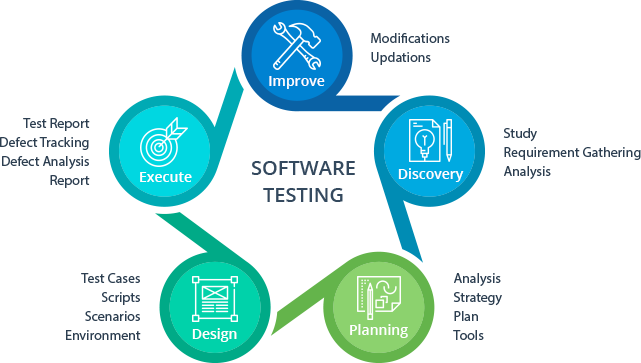
Course Syllabus
Manual Testing
Introduction to testing
Verification vs validation
Types of Applications
Probabilities of getting an error in an application
SDLC – Software Development Life Cycle
Waterfall
Prototype
Spiral
Incremental(Agile methodology and Scrum Framework)
V-Model
Advantages and Disadvantages of each software development life cycle
Principles of Testing
STLC –Software Testing Life Cycle
Difference between Test case, Use case and Scenario’s.
How to prepare test plan and strategy
How to Prepare test case template?
Difference between Error, bug, defect and failure
Test Case Design Technique
Boundary value Analysis
Equivalence Partitioning
Decision Table
State Transition Diagram
Use Case Testing
Bug Life cycle
How to Prepare Bug template?
Bug Tracking tool
Types of Testing
Difference between static and Dynamic testing
Difference between Functional and Non-functional testing
Black box testing and its types
White box testing and its types
System Integration Testing vs User Acceptance Testing
Entry Criteria and Exit Criteria
Test Environment and Test data preparation
Flow graph notations
Statement coverage
Branch Coverage
path coverage
Cyclometric Complexity
Integration testing
Big Bang Integration
Incremental Approach – Top Down, Bottom up and Hybrid
Requirement traceability matrix
Java Programming Basics
Java Programming Basics
Installing Java
Installing Eclipse
First Eclipse Project
First Java program
Concept of class file
Datatypes in Java
String class and functions
Conditional Statements
Loops
Arrays
Single Dimensional Arrays
Two Dimensional arrays
Practical usage of arrays in Selenium
Operators
What are Functions?
Function Input Parameters
Function Return Types
Object-Oriented Programming in Java
Local Variables
Global Variables
Static and Non-Static Variables
Static and Non-Static Functions
Creating Objects in Java
Meaning of static
Why is main method static?
Object and Object References
Call by reference and Value
Overloading and Overriding Functions
Access Modifiers – Public/Private/Default/Protected
Constructors
Interface
Usage of Objects in Selenium
Inheritance
Usage of Inheritance in Selenium
Creating Packages
Accessing Classes across Packages
Exception Handling
Exception handing with try catch block
Importance of exception handling
Exception and Error
Throwable Class
Final and Finally
Throw and Throws
Different Types of Exceptions
Need of exception handling in Selenium framework
Automating Text File Operations
Creating/Opening Text Files
Reading/Writing Text Files
Practical Examples
Automating Database Operations
Connecting to Databases
MySQL
Oracle
SQL Server
Sending SQL Queries to Database
Process the Results
Practical Examples
Selenium
Selenium
Introduction
What is Selenium?
Who developed Selenium?
Selenium Components
Selenium IDE
Installing Selenium IDE
Creating your First Selenium IDE script
How to use Locators in Selenium IDE
How to enhance a script using Selenium IDE
Creating and Running Tests
Creating and Running Test Suite
WebDriver Introduction
Introduction to WebDriver & Comparison with Selenium RC
Installing Selenium WebDriver
Architecture of selenium Webdriver
Creating your First Script in Webdriver
Launching AUT and Inspecting properties of Elements
Launching AUT in FireFox
Launching AUT in InternetExplorer
Launching AUT in Chrome
Launching AUT in Safari
Inspecting properties of Elements on different Browsers
Installing FireBug and FirePath
Creating FireFox Profile
Automating Operations on various Elements
Browser
TextBox
ListBox
Links
Check Box
Radio Button
HTML Tables
Calendars
Automating Keyboard and Mouse Events
Action Class
KeyBoard Events
Drag & Drop Actions
Mouse Hover Action
RightClick, Double Click & Tool Tip
Handling multiple Windows
getwindowHandle()
getwindowHandles()
Switching between windows
Handling elements present in different windows
Handling Alerts
accept()
dismiss()
getText()
sendKeys()
Handling Frames
What is iFrame?
Locating Frames
Switching between Frames
Handling Frames
Synchronization
ImplicitWait
WebDriverWait
FluentWait
PageLoadTimeout
What is TestNG?
Advantages of TestNG over JUnit
Why do we need TestNG in Selenium?
Installing TestNG in Eclipse
Creating a New TestNG Test File
Test annotation
Running the Test
Checking reports created by TestNG
Generating HTML Reports
Annotations used in TestNG
Validating Tests with Assertions
Creating multiple Tests
Prioritizing Tests
Parameterizing Tests with dataProvider
TestNG dataProvider with Excel
Creating and Running Test Suites with TestNG.xml
Parallel Test Execution with TestNG
Cross Browser Testing using TestNG
Automation Test Frameworks
Modular Driven Framework
Keyword Driven Framework
Data Driven Framework
Hybrid Framework
Page Object Model (POM) & Page Factory in Selenium
What is POM
Why POM?
Advantages of POM
Creating POM Tests
What is Page Factory?
Creating Tests with Page Factory
Database Testing using Selenium
JDBC (Java Database Connectivity)
Driver Manager
Driver
Connection
Statement
ResultSet
SQLException
Connecting to DataBases
Sending SQL Queries to Database
Processing Results
Real-time examples of Database Testing with Selenium
AutoIT
Installing AutoIT
Components of AutoIT
Using FinderTool
AutoIT commands
Creating Scripts in AutoIT
Creating executable files
Running AutoIT Scripts from Selenium
Selenium GRID
What is Selenium Grid?
When to Use Selenium Grid?
What is a Hub and Node?
How to Install and Use Grid 2.0?
Designing Test Scripts That Can Run on the Grid
Using the DesiredCapabilites Object
Using the RemoteWebDriver Object
Running a Sample Test Case on the Grid
Sequential and Parallel Test Execution
Running Tests on different Operating Systems
Running Tests on different Browsers
Maven & Jenkins
MAVEN
What is Maven and Why Maven?
Installing/Configuring Maven
Creating Maven Project
Importing Maven Project into Eclipse
What is POM.xml?
Adding Dependencies to POM.xml
JENKINS
Installing/Configuring Jenkins
Scheduling Test Execution in Jenkins
Auto mail configuration in Jenkins
What is continues integration?
Continues integration with JENKINS
GIT
Downloading and Installing GIT
Installing GIT and GITHUB plug-ins for JENKINS
Configuring SSH host keys for GIT and JENKINS
GIT Bash commands
Uploading project to GIT
LOG4J
Introduction about Logging
Logging problems without Log4J
How to solve Logging problem with Log4J
What is Layout?
Different types of Layouts in Log4J
What is Appender?
Different types of Appenders